 RuleCanon
One rules file for every AI assistant
Write your project rules once. RuleCanon keeps CLAUDE.md, AGENTS.md, Cursor, GEMINI.md and Copilot in step — and an edit in any of them flows back to all the others.
- Local only — no network
- Python 3, nothing to install
- Free · MIT
- macOS menu-bar app
Why
Write once
One master file, RULECANON.md. Every tool gets its own file in the format it expects.
Both ways
Fixed a rule straight in CLAUDE.md? Sync takes the edit into the master and on to every other tool.
Lossless
Your existing files are read in exactly as they are. Tool-specific parts stay with their tool.
Expiry and author
Tag an entry “by: ann; until: 2027-01-31”. Expired entries drop out of the generated files.
No keys in rules
rulecanon check finds API keys, tokens and passwords in rules and assistant memory, masked.
Watch
rulecanon watch — or one click in the menu bar — keeps everything in sync as you type.
One file in, every tool out
<!-- rulecanon
targets: claude, agents, cursor, gemini, copilot
-->

# Project rules

- Run tests before every commit.

<!-- only: claude -->
- Use the reviewer agent before deploy.
<!-- /only -->

- Freeze on main. <!-- by: ann; until: 2026-12-01 -->CLAUDE.mdAGENTS.md.cursor/rules/rulecanon.mdcGEMINI.md.github/copilot-instructions.mdStart in a minute
- Download and run
./install.sh(needs only Python 3). - In your project:
rulecanon init --sync— the master is built from the files you have. - From now on edit
RULECANON.md(or any tool file) and runrulecanon sync.
# Start in a minute
./install.sh
cd my-project
rulecanon init --sync
rulecanon check --home
rulecanon watch
Commands
rulecanon init | build RULECANON.md from the rules files you already have |
rulecanon sync | write every tool's file; take in hand edits; running it twice changes nothing |
rulecanon watch | sync on every change |
rulecanon check | passwords and keys, expired entries, files out of sync (--home: assistant memory too) |
rulecanon add | add an entry with author, expiry and tools |
rulecanon targets | list supported tools |
Supported tools
| Tool | File |
|---|---|
| Claude Code | CLAUDE.md |
| Codex, Amp, Jules, OpenCode | AGENTS.md |
| Cursor | .cursor/rules/rulecanon.mdc |
| Gemini CLI | GEMINI.md |
| GitHub Copilot | .github/copilot-instructions.md |
| Windsurf | .windsurf/rules/rulecanon.md · .windsurfrules |
| Cline | .clinerules/rulecanon.md · .clinerules |
| Junie | .junie/guidelines.md |
| Cursor (old) | .cursorrules |
How edits are handled
- A symlinked file (e.g. AGENTS.md → CLAUDE.md) is left as it is.
- A generated file you edited by hand: the edit goes into the master and to every tool.
- A file written by another program: read in for that tool only.
- Master and a tool file edited at once: the master wins, your copy is kept in .rulecanon/conflicts/.
- Other Cursor rules (.cursor/rules/*.mdc) are never touched.
Menu-bar app
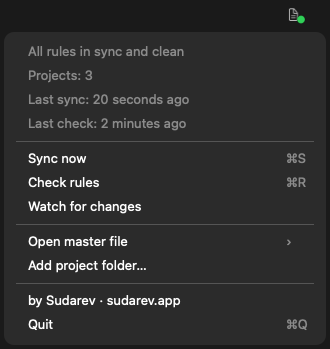
A status dot right in the macOS menu bar, with the actions you need most.
- nothing synced yet
- all in sync and clean
- out of sync, conflict or expired entries
- a password or key found
Tested on real projects
Checked on three real projects — a large toolkit with 190 rule lines, a Flutter game and a Unity game: every file says exactly what it said before, the master rebuilt from the generated files is the same, and a second sync changes nothing.
Privacy
RuleCanon reads and writes files in your project folder. It never uses the network and has no account or analytics. The menu-bar app keeps only project paths, times and counts in ~/.rulecanon/state.json — never the rules text or any found value.
Download
Free under the MIT licence. Unzip, run ./install.sh, done. The Mac app: unzip and move to Applications.